
Where to download a domicile certificate online
Start with the state where domicile was claimed, not the place where the applicant is temporarily living. The issuing route may be a state eDistrict portal, a revenue department, a district collector service, a citizen-service platform such as Aaple Sarkar, or a ServicePlus service page. Search for an approved or issued application before expecting a PDF download button.
A domicile certificate is not the same as a current address proof. It is commonly used to establish a durable state connection for education, public employment, quotas, scholarships or other state benefits, but eligibility rules, residence periods, document lists, fees and validity are set by the issuing authority. Read the current state instructions before uploading documents or paying a fee.
What you need before downloading
- Application or acknowledgement number for an already submitted request.
- Applicant name, date of birth and mobile number exactly as entered in the application.
- Identity proof and state-accepted residence evidence when applying or correcting a record.
- Parent, guardian, school, land, voter or legacy records when the state uses them to establish domicile.
- Access to the registered mobile number if the portal requires an OTP.
- A PDF reader and a secure device for saving the issued certificate.
How to download Domicile Certificate
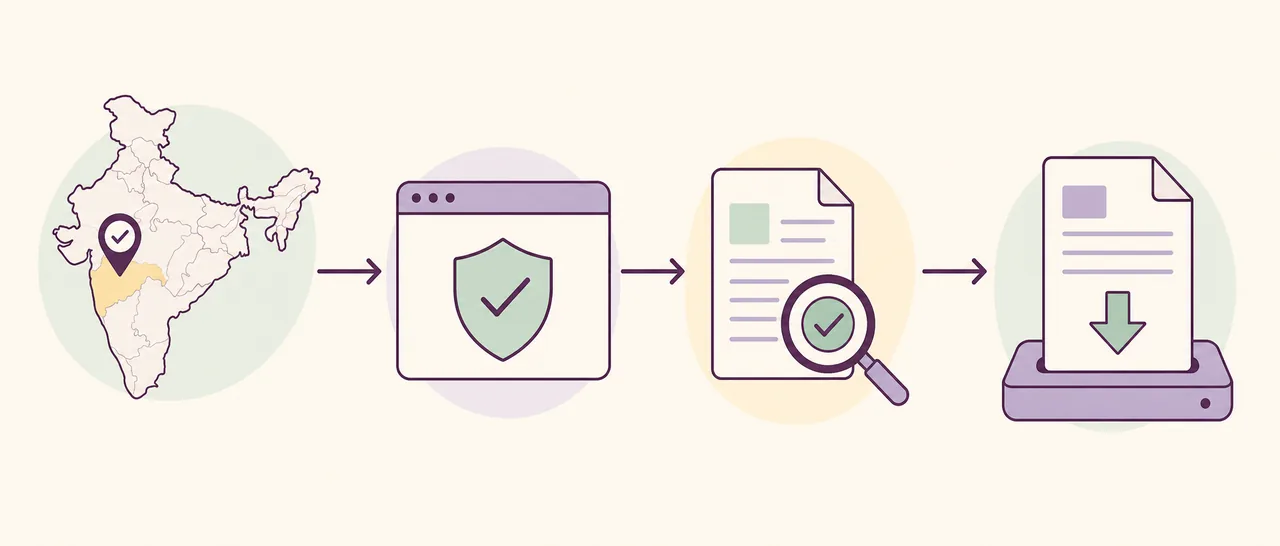
- Confirm the issuing state: Use the state or union territory where the domicile application was filed. A portal for the current temporary address will not normally hold another state’s record.
- Open the official service: Use the state eDistrict, revenue, citizen-service or ServicePlus page. Confirm the government domain before entering personal details.
- Choose the correct task: Select apply, track status, verify or download. A new application flow cannot retrieve a certificate that is still pending under a separate status menu.
- Find the approved record: Enter the application or acknowledgement number and any matching identity fields requested by the authority.
- Review the certificate: Check the applicant name, parent details, address, district, issue date, certificate number and digital signature or verification method.
- Save the PDF securely: Download the issued PDF on a trusted device, keep the original file unchanged and print only if the receiving institution requests a paper copy.
Choose the correct portal action
| Action | Use it when | Expected result |
|---|---|---|
| Apply | No domicile application has been submitted. | Application or acknowledgement number after submission. |
| Track | The request is submitted but not yet approved. | Pending, query, rejected or approved status. |
| Download | The authority has approved and issued the certificate. | Official PDF or printable certificate. |
| Verify | A certificate number or digitally signed PDF already exists. | Portal confirmation, signature check or record details. |
Common problems and fixes
The certificate is approved but no download appears
Sign in with the same account or mobile number used for the application, check issued documents and allow for the portal’s generation step. Some authorities provide the final copy through a service centre.
The application number is not found
Check the state, service name and number format. An acknowledgement from a district portal may not work on a separate statewide portal.
The address or name is incorrect
Do not edit the PDF. Use the correction, grievance or issuing-office process and keep supporting identity and residence documents ready.
The portal asks for documents again
A query usually means the authority needs clearer or additional evidence. Upload only through the authenticated government service and follow the deadline shown in the application.
Domicile certificate vs residence certificate
The labels are sometimes used loosely, but they may represent different legal or administrative purposes. A residence certificate can describe where a person currently lives, while a domicile certificate may require evidence of a permanent or long-term connection with the state. Some states use one service name for both ideas; others publish separate eligibility rules. Match the exact document requested by the college, employer or department instead of assuming that any address certificate will be accepted.
This distinction matters when searching online. Queries such as domicile certificate, residence certificate, permanent resident certificate and local resident certificate can lead to different state services. Read the service description, competent authority and required documents before applying. If the institution names a specific certificate, use that wording when selecting the government service.
Documents commonly checked for domicile applications
Document lists vary, but authorities commonly ask for identity proof, proof of residence, date-of-birth evidence and records connecting the applicant or family to the state. Depending on the scheme, examples may include voter records, ration card, land or property records, school certificates, utility records, a parent’s domicile certificate, an affidavit or a local inquiry. A document being common does not mean it is accepted in every state.
Use the checklist displayed by the issuing portal on the day you apply. Scan complete pages, keep names and dates consistent, and avoid cropped or unreadable uploads. If a record uses an older spelling or address, follow the authority’s correction or supporting-document process rather than altering the source document.
How to choose the right state portal
ServicePlus supports many government services, but not every state exposes domicile applications or downloads through the same national interface. Maharashtra users may encounter Aaple Sarkar, Uttar Pradesh users may use eDistrict, and other states may route through revenue, district or citizen-service portals. The correct destination is the authority that received or issued the application.
Before entering personal data, check the domain, HTTPS connection, department name and service description. Avoid pages that promise instant certificates, ask for OTPs outside the government login or claim they can change an issued PDF. This site links to public portals but never needs the applicant’s private record details.
What to check after downloading the domicile certificate
Confirm the spelling of the applicant’s name, parent or guardian details, district, address, certificate number and issue date. If the PDF contains a digital signature, open it in a compatible reader and use the issuer’s verification method when required.
Keep the original PDF unchanged. Renaming the file is usually harmless, but editing the page content, signature area or QR code can invalidate verification. Submit the file only to the institution that requested it and avoid sharing it publicly.
Domicile certificate download checklist
- The state matches the authority that received the application.
- The URL belongs to a government or officially named citizen-service portal.
- The application is approved or issued before download is attempted.
- The certificate details match the applicant’s supporting records.
- The digital signature, certificate number or verification method is visible.
- The original PDF is stored securely and has not been edited.
Official source and limitations
Primary route: ServicePlus or the relevant state eDistrict, revenue or citizen-service portal. Maharashtra and Uttar Pradesh are examples of states with their own published service routes and checklists.
Eligibility, residence period, documents, fees, processing time, validity and online download availability vary by state and authority. A portal link does not guarantee that every old or offline record has been digitised.
Domicile Certificate FAQ
Can I download a domicile certificate without an application number?
Some portals support account-based issued-document lists, but many require an application or acknowledgement number. Use the recovery or help option on the issuing portal rather than sharing personal details with a third party.
Is a domicile certificate the same as an address proof?
Not always. Address proof usually shows a present address, while domicile can establish a permanent or long-term state connection under state rules.
How long is a domicile certificate valid?
Validity is authority- and purpose-specific. Some institutions accept an older certificate, while another scheme may require a recently issued document. Check the receiving institution’s current notice.
Can DigiLocker provide a domicile certificate?
Availability depends on whether the issuing department publishes that document through DigiLocker. If it is not listed, use the state portal or issuing office.
What if my domicile certificate has an error?
Use the correction, grievance or reissue process of the issuing authority. Do not edit the downloaded PDF yourself.